Guide to CDNs, PoPs, and jsDelivr
aster global content delivery with this comprehensive guide to CDNs and Points of Presence (PoPs). Learn how to use jsDelivr to serve NPM packages and GitHub assets with blazing speed, auto-minification, and multi-provider reliability.
Author
Viruchith Ganesan
In modern web development, building a great application is only half the battle. The other half is delivering it quickly to your users, wherever they are in the world. A user in Bangalore should load your site just as fast as a user in New York.
If your server is located in the US, but your users are in India, they will experience lag. This is due to physical distance and network congestion. The solution to this global speed problem is a Content Delivery Network (CDN).
This article explains what CDNs are, why physical location matters, and how to use jsDelivr—a powerful, free, open-source CDN—to serve your project’s files with blazing speed.
What is a CDN (Content Delivery Network)?
Imagine you own a bakery in Delhi famous for its cookies. If someone in Mumbai wants to buy them, you have to ship them via courier. It takes time (latency) and if 1,000 people order at once, your bakery gets overwhelmed (server load). A CDN is like opening franchise outlets in Mumbai, Kolkata, Bangalore, and Chennai. You send the cookie recipe (your static files like CSS, JS, Images) to these outlets once. When a customer in Mumbai orders, they get fresh cookies from the Mumbai outlet instantly, rather than waiting for a shipment from Delhi. A CDN is a distributed network of servers around the world designed to deliver web content to users based on their geographic location.
What are PoPs (Points of Presence)?
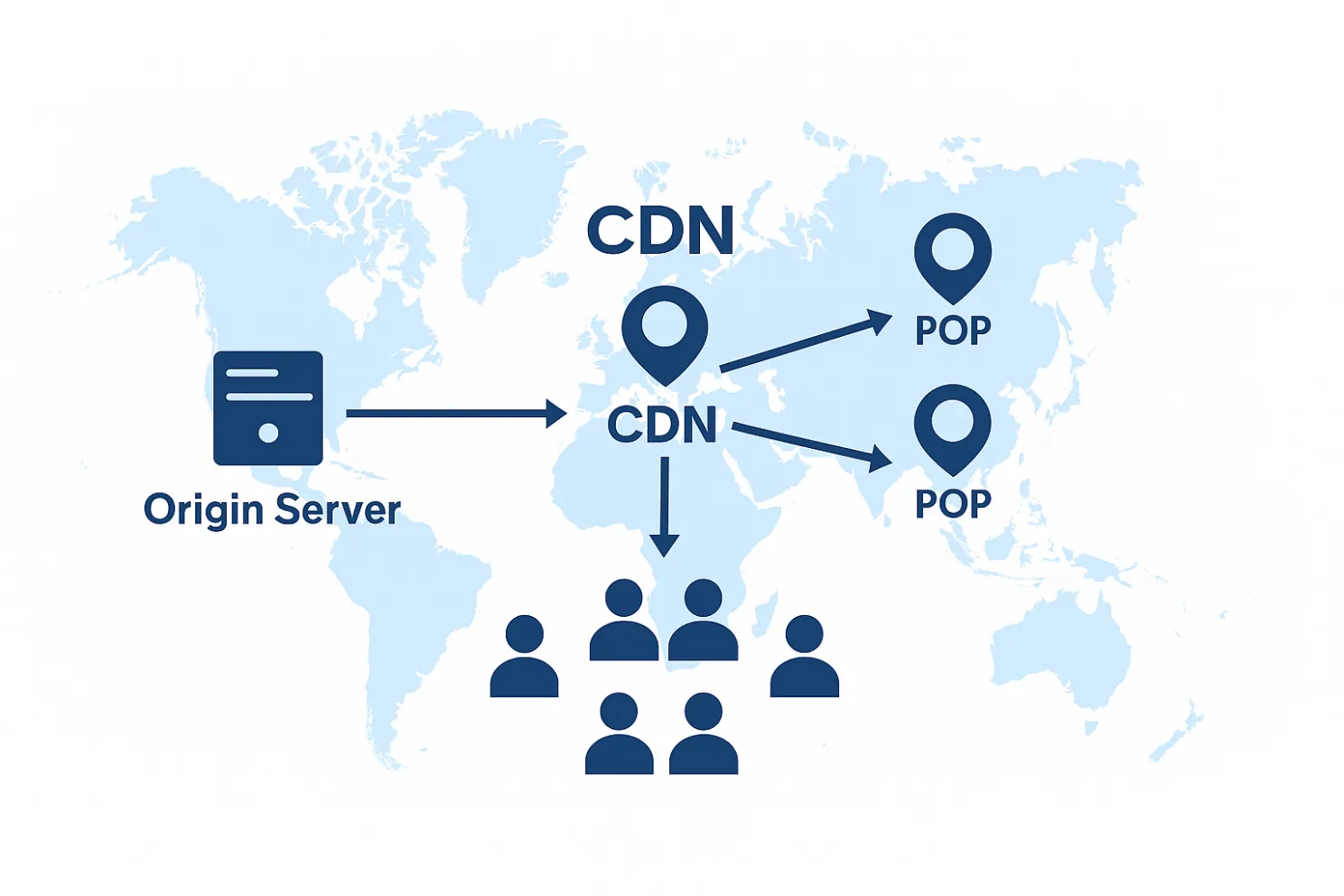
In the bakery analogy, the physical shop in Mumbai is the Point of Presence (PoP). A PoP is a physical data center located in a specific geographic area that contains CDN caching servers. The goal of a CDN is to have as many PoPs as possible, situated as close to end-users as possible. The closer the PoP is to the user, the lower the latency (the time it takes for data to travel).
The Problem: Distance equals Delay
Suppose you host your application on a standard server in the United States, perhaps in Google Cloud Platforms (GCP) us-central1 region (Iowa). When a user accesses your site from Hyderabad, India:
- Their request travels from Hyderabad, across undersea cables in the Atlantic or Pacific, all the way to Iowa.
- The server processes the request.
- The files (your 2MB JavaScript bundle, your CSS, your logo) travel all the way back to Hyderabad.
This round trip can easily take 250ms–400ms just in network travel time (latency), before the browser even starts rendering. In the web world, that feels sluggish.
The Solution: The Indian PoP
Major infrastructure providers like GCP have invested heavily in India, establishing reliable regions like Mumbai (asia-south1) and Delhi (asia-south2).
A top-tier CDN will have PoPs located in data centers within these regions.
When you use a CDN, the scenario changes:
- The user in Hyderabad requests your site.
- The DNS system realizes the user is in India and routes them to the nearest available PoP—likely the one in Mumbai.
- The Mumbai PoP already has a copy of your files cached. It serves them immediately.
The round trip is now perhaps 30ms–50ms. The site feels instantaneous.
Enter jsDelivr
There are many paid CDNs (like Cloudflare, Fastly, Akamai). However, for open-source projects, personal websites, and web applications that rely on public packages, jsDelivr is a spectacular choice.
Why jsDelivr?
- Its Free: Completely free for usage, with no bandwidth limits for legitimate use cases.
- Its a Multi-CDN: This is its superpower. jsDelivr doesnt run its own servers. Instead, it sits on top of multiple industry giants—including Cloudflare, Fastly, and BunnyCDN.
- It automatically routes users to the fastest underlying provider for their region.
- Deep Integration: It is designed specifically to serve files directly from NPM and GitHub.
A Practical Guide to Using jsDelivr
We will now use jsDelivr to serve different types of assets for your project.
Scenario A: Getting Standard WebApp Dependencies (NPM)
Almost every modern web project uses standard libraries like Bootstrap, React, Vue, or Tailwind. These are hosted on the NPM registry. jsDelivr mirrors the entire NPM registry automatically.
The Pattern: https://cdn.jsdelivr.net/npm/[package-name]@[version]/[path-to-file]Example: You want to include Bootstrap 5 CSS into your index.html.
Instead of downloading the file and serving it from your slow US server, use this:
<link rel="stylesheet" href="/assets/css/bootstrap.min.css">

<link rel="stylesheet" href="https://cdn.jsdelivr.net/npm/bootstrap@5.3.2/dist/css/bootstrap.min.css">
For JavaScript:
<script src="https://cdn.jsdelivr.net/npm/bootstrap@5.3.2/dist/js/bootstrap.bundle.min.js"></script>Tip: You can browse the contents of an NPM package on jsDelivr by visiting https://cdn.jsdelivr.net/npm/bootstrap@5.3.2/ in your browser.
Scenario B: Custom CSS/JS from your GitHub Repo
Let’s say you have a personal project repo on GitHub named my-awesome-app under username dev-raj. You have written custom styles and scripts.
Your repo structure:
github.com/dev-raj/my-awesome-app/
├── index.html
├── styles/
│   └── main.css
└── scripts/
    └── app.js
You want to serve main.css via CDN.
The Pattern: https://cdn.jsdelivr.net/gh/[username]/[repo]@[version/commit]/[path-to-file] Important Best Practice: Do not use the main or master branch directly in production. If you push a buggy update, you break your live site instantly. Instead, create Releases or Tags on GitHub (e.g., v1.0.1).
Example: You have tagged a release as v1.0.0.
<link rel="stylesheet" href="https://cdn.jsdelivr.net/gh/dev-raj/my-awesome-app@v1.0.0/styles/main.css">

<script src="https://cdn.jsdelivr.net/gh/dev-raj/my-awesome-app@v1.0.0/scripts/app.js"></script>
When a user in Delhi loads your site, jsDelivr fetches these files from GitHub once, caches them in their Mumbai PoP, and serves them lightning-fast thereafter.
Scenario C: Serving Media Assets from GitHub
CDNs aren’t just for code; they are excellent for images, fonts, and small media files. Lets say your repo has an images folder:
github.com/dev-raj/my-awesome-app/
└── images/
    ├── logo.png
    └── hero-banner.jpg
You can serve these directly in your HTML or CSS using the same GitHub pattern.
Example in HTML:
<img src="https://cdn.jsdelivr.net/gh/dev-raj/my-awesome-app@v1.0.0/images/logo.png" alt="My App Logo">Best Practices:
1. Auto-Minification (Reduce File Size)
What: jsDelivr automatically removes whitespace and comments from your code. How: Add .min to any file extension in your URL. Why: Smaller files mean faster downloads on mobile data.
- Standard: …/style.css (50KB)
- Minified: …/style.min.css (35KB)
2. Bundle Requests (Reduce Latency)
What: Merge multiple CSS or JS files into a single HTTP request to avoid “handshake” delays. How: Use the /combine/ prefix and separate files with
<link href="https://cdn.jsdelivr.net/combine/npm/bootstrap@5/dist/css/bootstrap.min.css,npm/font-awesome@4/css/font-awesome.min.css" rel="stylesheet"> 3. Use Exact Versioning (Maximize Caching)
What: Lock your file to a specific release tag (e.g., @1.0.1) instead of ranges (e.g., @1). How: https://cdn.jsdelivr.net/gh/user/repo@v1.0.1/style.min.css Why: Exact versions are cached forever by the browser. “Latest” versions expire quickly, forcing the user to check for updates constantly.
4. Enable SRI (Security)
What: Use Subresource Integrity to ensure the file hasn’t been hacked or tampered with. How: Add the integrity and crossorigin attributes to your HTML tags. Why: If the CDN is compromised, the browser blocks the file, protecting your users.
5. Emergency Cache Purge
What: Instantly force the CDN to refresh a file if you deployed a bug. How: Replace cdn with purge in your browser’s address bar.
https://purge.jsdelivr.net/gh/user/repo@v1.0.0/app.js Why: Fixes critical errors immediately without waiting for the cache to expire naturally.