Parallel AI Coding Agents: How to Run an Army of LLMs Without Git Chaos
Discover the engineering patterns behind parallel AI coding agents. Learn how tools like Cursor, Copilot, and Claude Code isolate workspaces, avoid deadlocks, and merge code cleanly.
Author
Viruchith Ganesan
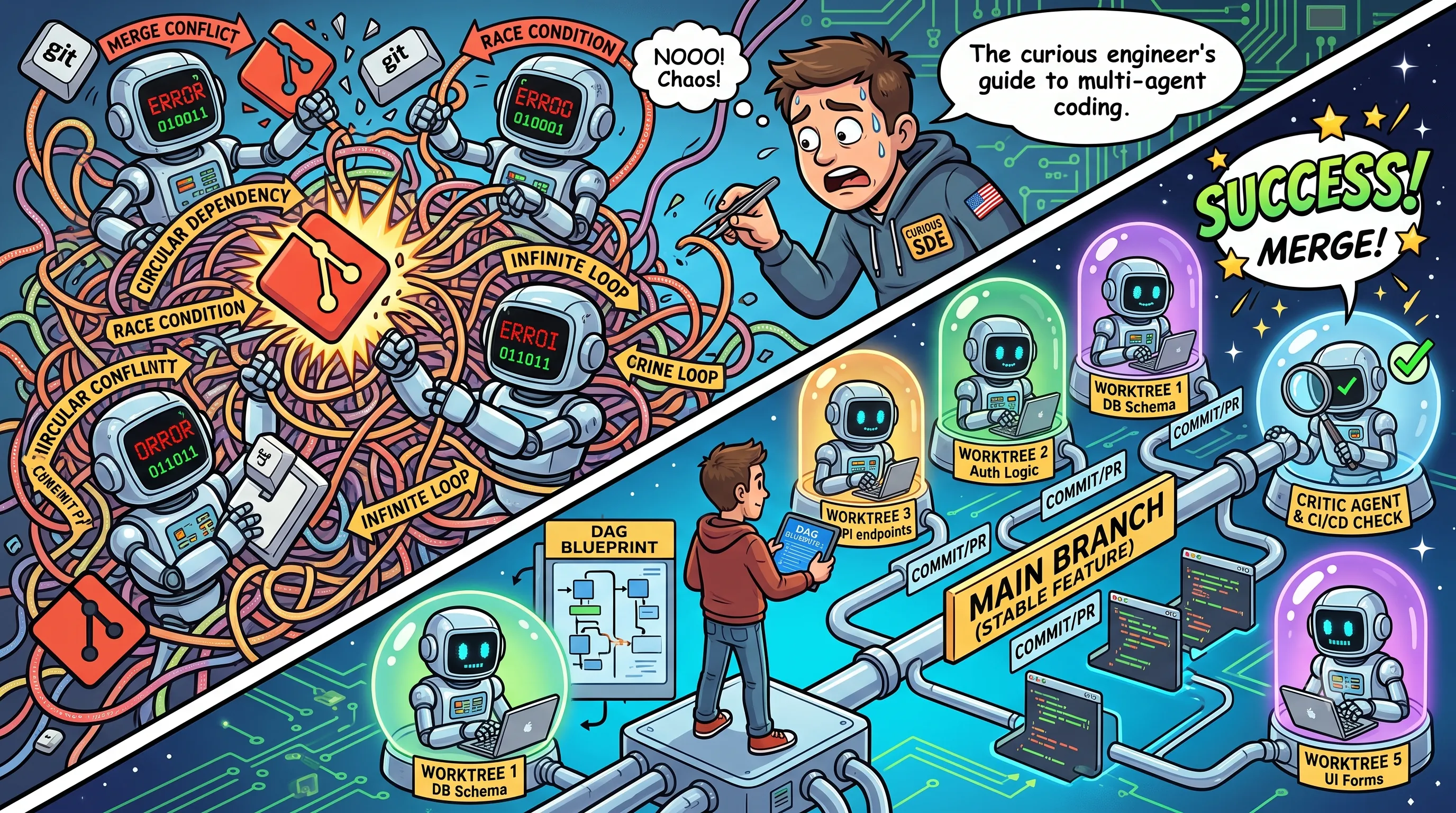
As software engineers, we’ve all fantasized about it: you sit down, design a complex feature, break it into five distinct sub-tasks, and hand them off to five parallel junior developers. By lunchtime, you have a fully working, tested feature.
With the sudden rise of autonomous multi-agent development platforms, we can now attempt this—except our “junior developers” are LLM-powered coding agents.
But if you’ve ever tried letting multiple AI prompts loose on a single codebase simultaneously, you know the dream can quickly turn into a nightmare. Without strict engineering guardrails, parallel coding agents behave like rogue developers operating without Git: they clobber each other’s code, introduce circular dependencies, trigger infinite loops trying to fix each other’s compiler errors, and leave your workspace in a chaotic, half-finished state.
So, how do advanced multi-agent architectures actually solve this problem? How do commercial engineering tools execute code in parallel safely? Let’s dive into the production-grade engineering patterns that make parallel agent execution possible.
The Architecture of Parallel Agent Systems
When you run multiple coding agents in parallel, the orchestrator must solve three core problems:
- Isolation: Each agent must have its own workspace and file system boundaries to prevent race conditions
- Deadlock Avoidance: Agents must be aware of dependencies between tasks to prevent circular waits and stalled execution
- Convergence: After parallel execution, the orchestrator must merge the agents’ work
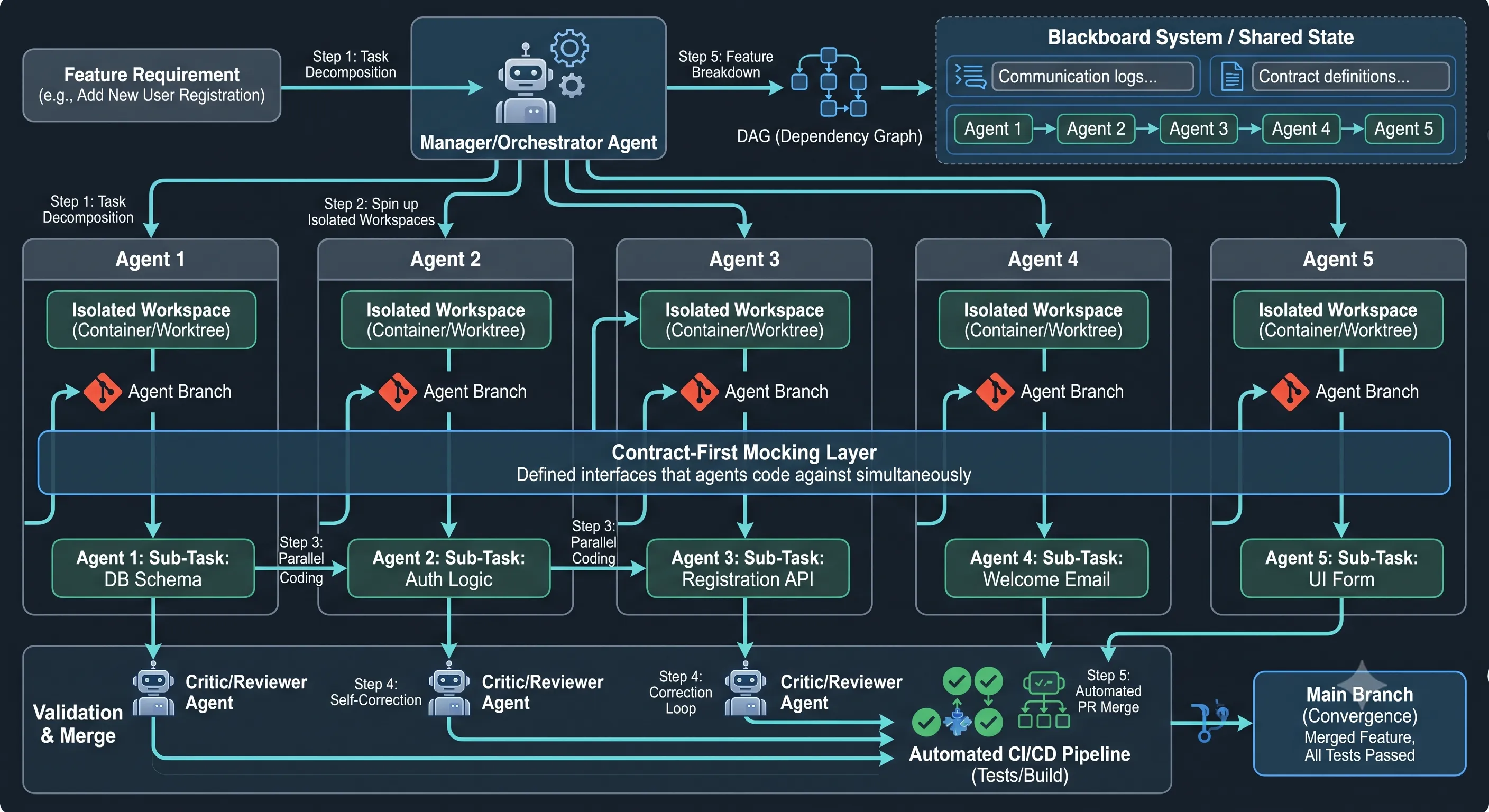
The Three-Layer Architecture Model
Modern parallel agent systems are built on a tiered architecture that directly addresses the isolation, deadlock avoidance, and convergence problems outlined above:
- Orchestration Layer: The top-level scheduler that breaks down features into tasks, parses dependencies into a DAG, assigns priorities, and manages execution sequencing. This layer uses the Planner-Executor Split to define contract requirements before any code is written.
- Execution Layer: Individual isolated agent processes that perform actual code generation and transformation within sandboxed Git worktrees or containerized environments. Each executor operates within strict AST-level scoping boundaries and cannot modify code outside its assigned file paths.
- Synchronization Layer: A centralized Blackboard event bus and state machine that handles inter-agent communication, Change Proposals, conflict detection, and merge coordination. It monitors for semantic drift and injects dynamic context updates into running agents when shared state changes occur.
This layered approach ensures that agents remain loosely coupled while maintaining strong guarantees about consistency and correctness, enabling safe parallel execution without race conditions or deadlocks.
1. The Isolation Layer: Ephemeral Git Worktrees
If two agents attempt to write code in the same directory at the exact same time, you encounter classic race conditions. Agent A reads a file, starts generating a class, and before it can write, Agent B overwrites the file’s utility methods.
To prevent this, agent orchestrators rely on two main isolation primitives:
- Git Worktree Sandboxing: Advanced platforms do not run parallel agents inside your primary active directory. Instead, they use a core Git feature:
git worktree. A worktree allows an agent to check out a completely independent branch into a distinct file directory on your machine or in the cloud while sharing the same underlying.githistory. Each agent gets its own containerized sandbox. They have zero awareness of what the other four agents are typing in real time. - AST-Level Scoping: Before an agent is initialized, the orchestrator parses the codebase into an Abstract Syntax Tree (AST)—a structural map of your code’s logic. The orchestrator uses this to define strict read/write permissions. For instance, if Agent 1 is assigned to the database repository layer, its workspace write-privileges are locked to that specific package. It can read the rest of the codebase for context, but its file system tools are restricted from modifying anything outside its boundary.
2. Solving Deadlocks: Directed Acyclic Graphs (DAGs)
If Task B relies on a data model being generated by Task A, running them completely concurrently results in a logical deadlock. Agent B will either stall out or hallucinate a non-existent data structure.
To orchestrate this cleanly, agent frameworks utilize a Planner-Executor Split.
Before a single line of code is written, a high-reasoning Planner Agent parses the epic feature requirement and maps the five sub-tasks into a Directed Acyclic Graph (DAG). The graph determines execution order based on hard code dependencies.
The Contract-First Solution (Interface Mocking)
What if tasks are tightly coupled, but you still want maximum parallelism? The orchestrator enforces a Contract-First approach. Before the parallel executors are spun up, a synchronization phase occurs where the agents collectively define the API contracts, DTOs (Data Transfer Objects), and interface method signatures.
Once these contracts are frozen, Agent B can write its logic using mocked stubs of Agent A’s work. They code simultaneously because the boundaries of what they give and take are set in stone.
3. Conflict Avoidance: The Blackboard Pattern
Even with isolated branches, semantic drift occurs. For example, Agent 1 might alter a shared global configuration variable that Agent 2 was assuming would remain constant.
To resolve this, multi-agent systems use a data architectural pattern known as the Blackboard System:
The Blackboard Pattern: Agents never communicate directly peer-to-peer. Instead, they interact with a central, monitored state machine (the Blackboard).
If Agent 1 realizes a feature absolutely requires updating a shared utility class, it must log a structured “Change Proposal” to the Blackboard. The central coordinator agent evaluates the proposal. If approved, the coordinator updates the system state and dynamically injects the new context into the prompt streams of the other four running agents.
Furthermore, foundational frameworks rely on Immutable Core Libraries. Shared boilerplate, environment setups, and baseline project configs are frozen before execution. If global foundational shifts are required, they are pulled out and executed in an isolated “Stage 0” phase before parallel agents are spawned.
4. Convergence: The Automated CI Feedback Loop
Parallel agents don’t just write code; they must prove it works before it ever reaches the main branch. The transition from five isolated worktrees to a singular, cohesive feature is managed by a strict validation lifecycle loop:
- The Critic Ensemble: Every executor agent is paired with a distinct “Reviewer” or “Critic” agent. When the executor finishes its file changes, the Critic runs static analysis and checks for architectural anti-patterns.
- Self-Correcting Compilation Loops: The orchestrator runs an automated local CI pipeline (linters, type checkers, and test suites) inside the agent’s worktree. If the code breaks the build, the console logs and error stack traces are fed straight back into the executor agent’s context window alongside a directive: “Your code caused a compilation error. Analyze the stack trace and patch it.” The agent loops autonomously until the build is perfectly green.
- Linear Rebase Integration: Branches are never dumped into the main branch all at once. The orchestrator integrates them sequentially. After Branch 1 is merged, Branch 2 is rebased against the newly updated main branch. The test suite runs again to catch any new semantic conflicts. If a merge conflict does occur during this phase, a specialized Conflict-Resolution Agent is spun up specifically to look at the git diffs, resolve the logic gaps, and commit the clean patch.
5. How Commercial Toolmakers Handle Concurrency (As of 2026)
The engineering community has deeply integrated these patterns into everyday development environments. Here is a snapshot of how the leading developer ecosystems execute multi-file, parallel agent workflows today:
| Platform | Concurrency & Isolation Strategy | Coordination Model | Convergence Mechanism |
|---|---|---|---|
| GitHub Copilot Cloud Agent & VS Code | Runs asynchronously inside GitHub Actions-powered cloud environments or isolated local subagent sessions. | Driven by a central workflow plan or an AGENTS.md context file. | Automatically wraps code changes into standard GitHub PRs for CI evaluation. |
| Cursor (Agents Window) | Spins up multiple background executor agents using localized file path limits. | Planner-Executor Split: A frontier reasoning model constructs the code blueprints before executors type. | An interactive human-review sidebar displays live multi-file diffs to allow fast developer intervention. |
| Claude Code (Anthropic CLI) | Leverages background process delegation (&) and parallel asynchronous context streams. | Agent Teams: A dynamic hierarchy where sub-agents must submit sub-plans to a Lead Agent for validation. | Utilizes terminal lifecycle hooks (TaskCompleted, PreToolUse) to auto-block merges on test failures. |
| FOSS / Open Source Wrappers (e.g., Superset) | Manages 10+ open-source or proprietary terminal agents locally. | Uses native Git commands to build physical, isolated project worktrees for every active agent window. | A unified, side-by-side terminal split and built-in diff viewer allowing manual or agentic merges. |
6. The Blueprint: How to Delegate Tasks to Parallel Agents
To make parallel execution work—whether you are using an out-of-the-box IDE agent or building a custom orchestration pipeline—you must structure your data delegation meticulously.
The Orchestrator System Prompt
When building a manager agent tasked with setting up a feature breakdown for sub-agents, use a structural prompt that forces strict scoping:
You are the Lead Architect Agent. Your job is to break down a major feature into independent, decoupled sub-tasks for parallel developer agents.

When generating the execution blueprint, you MUST follow these constraints:
1. IDENTIFY DEPENDENCIES: Analyze which files and logic blocks depend on others. Organize them into a strict sequence layout. Tasks with 0 dependencies must run in parallel first.
2. DEFINE EXPLICIT SCOPES: For each sub-task, define the exact file paths the sub-agent is permitted to write to. No two agents should have overlapping write scopes.
3. CONSTRUCT CONTRACTS FIRST: If Task B requires logic from Task A, your first instruction to both agents must be to define the interface/DTO signatures. Task B must use mocked stubs of Task A until Task A passes validation.
4. OUTLINE DEFINITION OF DONE: Provide exact compilation checks and unit test files that each sub-agent must execute locally before declaring completion.

Output your blueprint using the following JSON structure:
{
  "feature_name": "String",
  "execution_stages": [
    {
      "stage_id": 1,
      "parallel_tasks": [
        {
          "task_id": "T1",
          "assigned_scope": ["src/main/path/file.java"],
          "dependencies": [],
          "contract_requirements": "Define DTO structural contract for...",
          "definition_of_done": "Run test suite X and ensure zero compilation warnings."
        }
      ]
    }
  ]
}
Best Practices for Human Engineers Delegating to Agents
If you are directing an ecosystem of parallel agents, follow these core principles to ensure success:
- Keep Features Modular: If your application layer is a massive, highly coupled monolith with spaghetti logic, parallel agents will inevitably hit synchronization deadlocks. The more your codebase adheres to clean separation of concerns (e.g., domain-driven design, microservices, neat abstraction layers), the easier it is for an orchestrator to assign clean boundaries.
- Insist on Comprehensive Test Coverages: Agents thrive when there is a clear, programmatic ground truth. If your project has extensive unit and integration tests, you give the agent a deterministic target to iterate against.
- Act as the Final Gatekeeper: Do not let an agent automatically merge code straight into your production branch. Use tools like Cursor’s Composer or standard Git Pull Requests to visually audit the synthesized code before it becomes part of your primary branch history. Treat the AI agents as a powerful, hyper-efficient production engine, but keep the architectural veto power in human hands.