Supercharge Your AI Workflow: Introducing Prompt Butler
Discover Prompt Butler, a lightweight, free, and open-source (FOSS) JavaFX desktop overlay that supercharges your AI workflow. Learn how to eliminate context-switching friction by instantly searching, filling variables, and copying your favorite LLM prompt templates straight to your system clipboard using a global hotkey.
Author
Viruchith Ganesan

If you are a developer, technical writer, or power user, you likely find yourself interacting with Large Language Models (LLMs) multiple times a day. Over time, you build a mental library of highly effective prompts: refactoring assistants, git commit message generators, code review templates, and tone adjusters.
But where do you keep them? Buried in markdown files? Stash-pasted into browser tabs? Scrolled way back in your ChatGPT history?
Moving between your IDE and a chaotic prompt-management system breaks your development flow. That is why we built Prompt Butler—a lightweight, always-on-top JavaFX desktop overlay designed to store, fuzzy-search, dynamically populate, and instantly inject your prompt templates into your clipboard.
The Problem: The “Context-Switching” Tax in Prompt Engineering
Prompt engineering is an iterative process, but managing those prompts introduces significant friction:
-
The Clipboard Dance: Copying a prompt from a local text file, pasting it into a chat UI, navigating back to your IDE to grab code, and pasting that code back into the prompt.
-
Rigid Templates: Prompts are most useful when parameterized (e.g., changing the programming language or coding style contextually). Manually replacing text placeholders like
[INSERT CODE HERE]is error-prone and tedious. -
Loss of Flow State: Reaching for a browser tab or opening a massive markdown file completely yanks you out of your terminal or IDE.
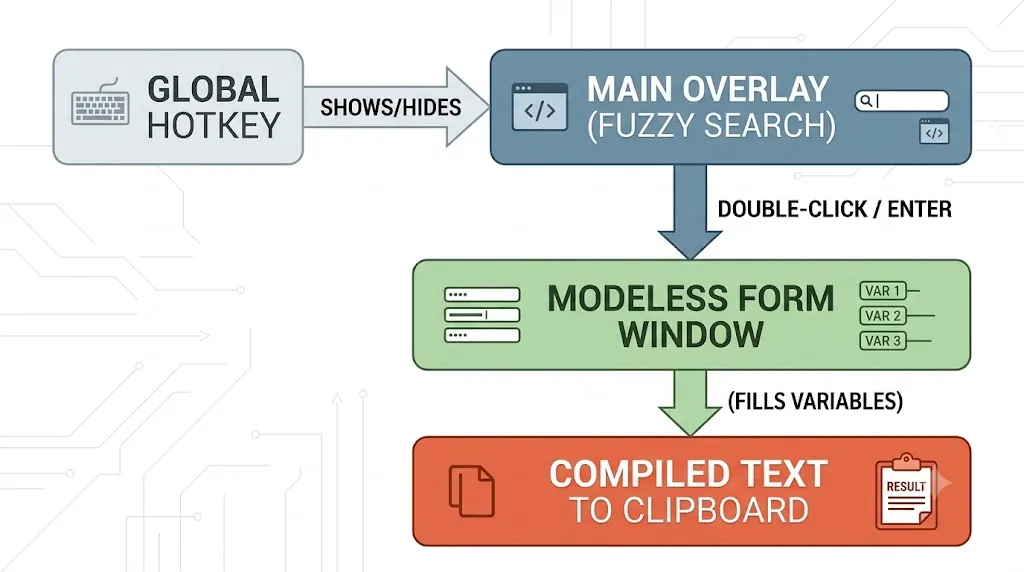
Prompt Butler eliminates this tax. With a single global hotkey, an overlay surfaces on top of your current active window. You fuzzy-search a template, fill out auto-generated form fields for your variables, and press enter. The fully compiled prompt is instantly on your clipboard, ready to paste.
The High-Level Tech Stack
Prompt Butler is engineered for speed, low memory overhead, and true cross-platform native execution (Windows, macOS, and Linux).
-
Java 17+ & JavaFX 21: Chosen for building a high-performance, GPU-accelerated desktop user interface with native look-and-feel capabilities. JavaFX allows the app to render a sleek, transparent, borderless overlay frame that comfortably rests over your workspace.
-
Gradle 8.7: Powers the modern build automation, dependency resolution, and specialized distribution layouts.
-
jNativeHook: Provides low-level global keyboard listeners, enabling the application to intercept the configured activation shortcut even when it is completely defocused or minimized to the system tray.
-
Gson & File-Based Storage: Instead of forcing you to spin up a local database instance or connect to a cloud service, your prompt library is saved locally as clean, human-readable, and version-controllable JSON files.
How It Works: Architecture & Usage Flow
Prompt Butler separates its footprint into two primary UX concepts: the Main Overlay and the Modeless Variables Window.
1. Fast Activation & Fuzzy Search
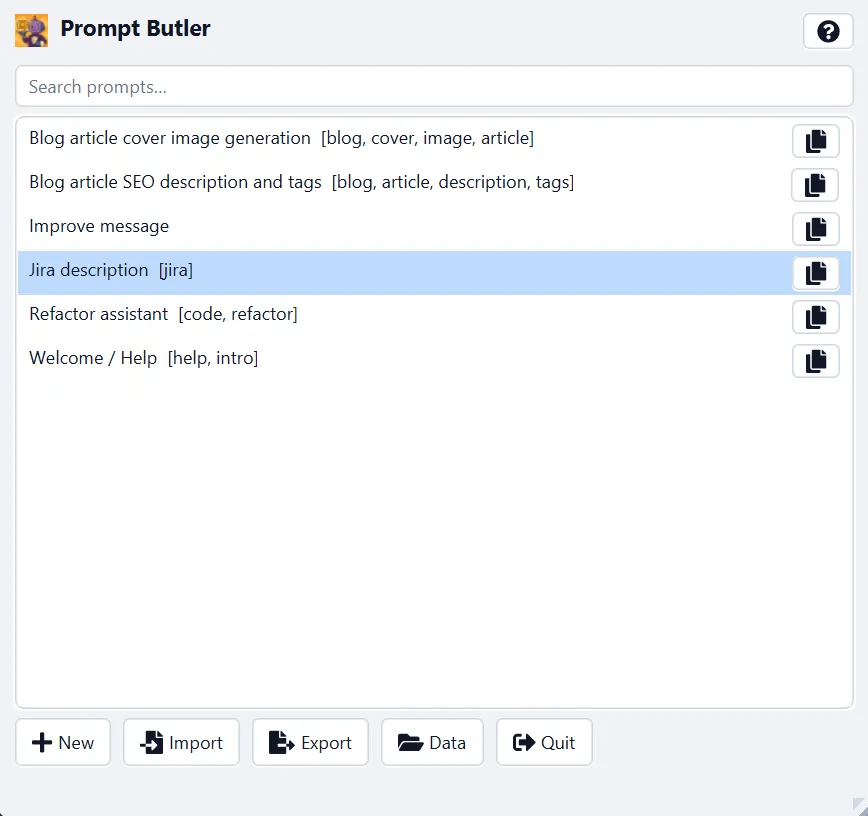
By hitting Ctrl+Alt+P (Cmd+Alt+P on macOS), the overlay instantly snaps to the front of your screen. Type your search query immediately—the app executes an instantaneous fuzzy match against both template titles and tags.
2. Variable Compilation
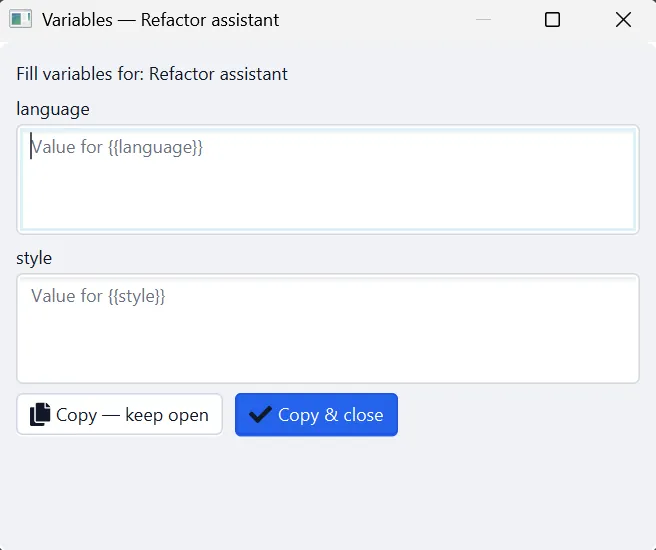
When you build a template, you can declare dynamic parameters using standard {{double_curly_braces}} syntax. For example:
Act as an expert {{language}} developer and refactor the following code with {{style}} conventions:

{{code_block}}
When you select this prompt and hit Enter, Prompt Butler parses the AST of the string, extracts the unique variables, and dynamically spins up a modeless form window containing a dedicated input field for each variable (language, style, and code_block).
The main overlay stays visible underneath, letting you continue browsing or searching while keeping your form active.
3. Deep Keyboard Navigation
-
Enteron text fields: Seamlessly jumps focus to the next variable field. -
Enteron the final field: Triggers the Copy & Close macro. The placeholders are injected with your inputs, the output string compiles directly into your system clipboard, and the form window self-destructs. -
No Variables? If a template contains zero placeholders, double-clicking it skips the form window entirely, copies the raw text, and auto-hides the overlay for immediate pasting.
Quick Start & Code Guide
Running from Source
If you want to clone the repository and boot the application directly using the Gradle wrapper, execute the following commands in your terminal:
# Clone the repository
git clone https://github.com/viruchith/PromptButler.git
cd PromptButler

# Run on macOS/Linux
./gradlew run

# Run on Windows
.\gradlew.bat run
Scripted Profiles
Prompt Butler supports environmental flags directly through Gradle properties:
-
Production Run (Default):
./gradlew runbuilds with optimization and optimized logging. -
Development Mode:
./gradlew run -Penv=devactivates verbose internal logging, a structural development border around the overlay, and seeds your database with a mock dataset (dev-prompts.json) if your store folder is blank.
Declarative JSON Prompt Example
You can comfortably manage, backup, or share your prompts by modifying the prompts.json file inside your custom-defined data directory. The schema relies on standard UUID identifiers:
{
  "id": "f47ac10b-58cc-4372-a567-0e02b2c3d479",
  "title": "Commit Message Generator",
  "body": "Write a concise Git commit message for the following diff.\n\nRepository context: {{repo}}\n\nDiff:\n{{diff}}",
  "tags": ["git", "commit", "engineering"]
}
Building and Packaging for Production
When you are ready to distribute Prompt Butler as a standalone application across your team, the repository is optimized for discrete deployment strategies:
The installDist Layout (Recommended)
Executing the distribution task compiles code and generates custom native launch scripts tailored to the host architecture:
./gradlew installDist
This outputs a completely decoupled runtime structure inside build/install/prompt-butler/.
- On Windows (
.bat): The startup script routes throughjavawand forks withstart "", allowing the spawning terminal console to immediately exit while leaving the lightweight JavaFX background process flawlessly attached to your system tray.
Building Native Platform Installers (jpackage)
For seamless deployments, you can pass the output of installDist straight into the OpenJDK jpackage utility. This lets you wrap Prompt Butler, alongside a minimal stripped-down Java runtime image generated via jlink, directly into standalone native installers like .msi (Windows), .dmg (macOS), or .deb (Linux).
Open Source & Contributions
Prompt Butler is completely free software built under the GNU General Public License v3.0. The internal logic is split into standalone modules, drawing a clean separation line between Core Java routines (com.viruchith.PromptButler.core) and Platform UI code (com.viruchith.PromptButler.ui), keeping unit test coverage high and code changes predictable.
Ready to clean up your AI workflow? Head over to the Prompt Butler GitHub Repository, star the project, check out the deep-dive architectural specifications in TECHNICAL.md, and start building your ultimate prompt library today!